
简 介
Azure RTOS ThreadX 是 Microsoft 提供的高级工业级实时操作系统 (RTOS)。它是专门为深度嵌入式实时 IoT 应用程序设计的。Azure RTOS ThreadX 提供高级计划、通信、同步、计时器、内存管理和中断管理功能。此外,Azure RTOS ThreadX 具有许多高级功能,包括 picokernel™ 体系结构、preemption-threshold™ 计划、event-chaining™、执行分析、性能指标和系统事件跟踪。Azure RTOS ThreadX 非常易于使用,适用于要求极其苛刻的嵌入式应用程序。Azure RTOS ThreadX 在各种产品(包括消费者设备、医疗电子设备和工业控制设备)上的部署次数已达数十亿次。
具体的介绍和用户指南可以参考:
https://docs.microsoft.com/zh-cn/azure/rtos/threadx/
在前文描述移植基本内核的基础上,本文描述了如何基于MM32F3270系列MCU结合Azure RTOS ThreadX实现消息队列块的使用,引导用户理解Azure RTOS ThreadX消息队列的功能。
上期样例工程可通过下方链接进行下载:
包括底层启动文件的移植, 系统 Systick 的配置技巧,引导用户理解 Azure RTOS ThreadX 基本应用。
表 1 适用系列型号

1、移植应用的准备
1.1 硬件开发板的准备
该移植过程中应用的开发板为MM32的EV Board(MM32F3273G9P)
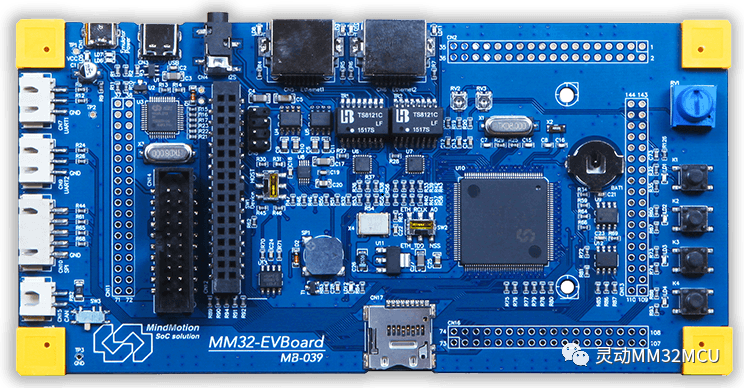
EV Board (MM32F3273G9P) 的简要参数:
● Arm Cortex-M3 内核
● 板载 MM32F3273G9P(LQFP144)
● USB Host / Device、SPI、I2C
● 4 x Key、4 x LED
● I2S Speaker
● TF-Card
● Ethernet PHY
1.2 软件的准备
库函数和例程(Lib Samples)
该移植过程中应用的 Firmware 分别为 MM32F3270 库函数和例程,下载地址:
https://www.mindmotion.com.cn/products/mm32mcu/mm32f/mm32f_mainstream/mm32f3270/
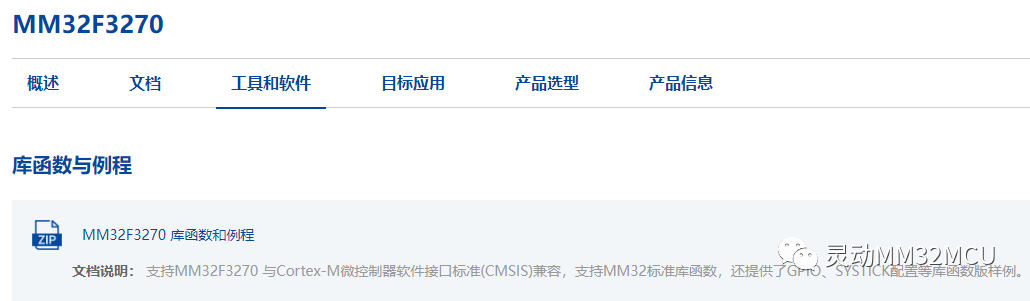
Azure RTOS ThreadX(源码)
ThreadX 的源代码已经开放,我们可以从 ThreadX 公共源代码存储库获取 Azure RTOS ThreadX,网址为:https://github.com/azure-rtos/threadx/
具体的商用使用条件参考Azure的许可证说明:
Microsoft publishes the Azure RTOS source code to GitHub. No license is required to install and use the software for internal development, testing, and evaluation purposes. A license is required to distribute or sell components and devices unless using Azure RTOS licensed hardware.
Azure RTOS 何时需要许可证?
Microsoft 将 Azure RTOS 源代码发布到 GitHub。安装和使用该软件进行内部开发、测试和评估无需许可证。分发或销售组件和设备需要许可证,除非使用 Azure RTOS 许可的硬件。
ThreadX 安装
可以通过将 GitHub 存储库克隆到本地计算机来安装 ThreadX。下面是用于在 PC 上创建 ThreadX 存储库的克隆的典型语法。
shell复制
git clone https://github.com/azure-rtos/threadx
或者,也可以使用 GitHub 主页上的“下载”按钮来下载存储库的副本。
下载后的仓库代码目录列表如下:

Azure RTOS ThreadX(源码)支持的开发环境
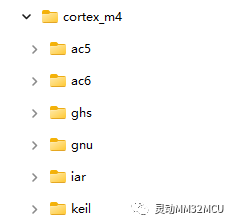
ThreadX 内核提供好了各种主流硬件平台和软件平台的移植文件,以Cortex_M3为例,可以支持以下六种开发环境:
本次移植过程使用Azure RTOS原有的sample_threadx.c Samples为例子,稍作修改,演示了消息队列的作用。
2、Threadx 的消息队列的应用
该章节介绍了消息队列应用的实现的过程和注意事项,该演示程序可在 MM32F3273G9P 的 EV Board 上运行。
此示例在文件 main_queue_task.c 中定义,旨在说明如何在嵌入式多线程环境中使用message quenue,实现任务之间的数据信号传递与同步。
2.1 Azure Threadx queue 应用简介
消息队列是RTOS中常用的一种数据通信方式,常用于任务与任务之间或是中断与任务之间的数据传递。在裸机系统中我们通常会使用全局变量的方式进行数据传递,比如在事件发生后在中断中改变数据和设置标志,然后在主循环中轮询不同的标志是否生效来对全局数据执行不同的操作,执行完毕后清除相关标志。但是这种方式需要不断地轮询标志状态,使得CPU的利用率并不高。而使用RTOS的消息队列则具有任务阻塞机制,当没有需要处理的消息时任务挂起等待消息,此时其他任务占用CPU执行其他操作,当有消息放入队列时任务恢复运行进行消息接收和处理。这种消息处理机制相比裸机而言大大地提高了CPU利用率。
ThreadX的消息队列支持“消息置顶通知”功能,也就是可以将消息放在队列的最前面,使得任务可以及时处理某些紧急消息。
ThreadX的消息队列可以传递任意长度的数据,因为它是采用传递数据指针的方式(一些其他RTOS支持传递整体数据内容。Threadx的queue使用指针传递方式优点是执行效率高,缺点是存数据的内存区域如果数据还未及时处理就被覆写了那么就会引发问题;而部分其他RTOS使用整体数据传递方式,其优点是安全不需担心数据覆写致错,缺点是数据量大的话传递数据过程执行时间长导致效率低)。
Threadx支持消息队列进行线程间通信或者从中断程序向线程发送消息队列。
消息队列中消息通常按照先进先出规则传递,同时提供了把消息直接存储到队列头部的API。每个线程可以创建多个消息队列,并且可以使用多个消息队列和多个线程通信。
消息队列不支持拥有者属性,也就是任何线程可以向消息队列发送或接收消息。应用开发者保证消息队列使用的合理性。
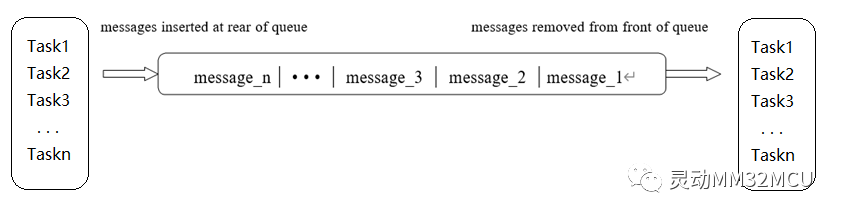
消息传递规则
a)任何线程可以向一个消息队列发送或接收消息,消息队列不支持拥有者属性。
b)消息队列支持先进先出规则,函数_tx_queue_send发送消息都队列尾部。
c)消息队列也支持发送消息到消息头部功能,函数_tx_queue_front_send发送消息到消息头部。
d)如果消息队列有挂起的接收线程,发送消息时,可以直接把消息放到接收线程的缓冲中,这可以降低消息传递延时。
e)TX_THREAD线程控制块中tx_additional_suspend_info域用于存储接收线程缓冲区地址。
f)如果消息队列为空,接收线程调用_tx_queue_receive(wait_option不为0)读取消息时,线程会被挂起到队列tx_queue_suspension_list。其它线程发送消息后会恢复挂起的线程。
g)如果消息队列已满,发送线程调用_tx_queue_send(wait_option不为0)发送消息时,线程会被挂起到队列tx_queue_suspension_list。其它线程接收消息时,会恢复挂起的线程。
如下是Threadx Message Queue的属性:
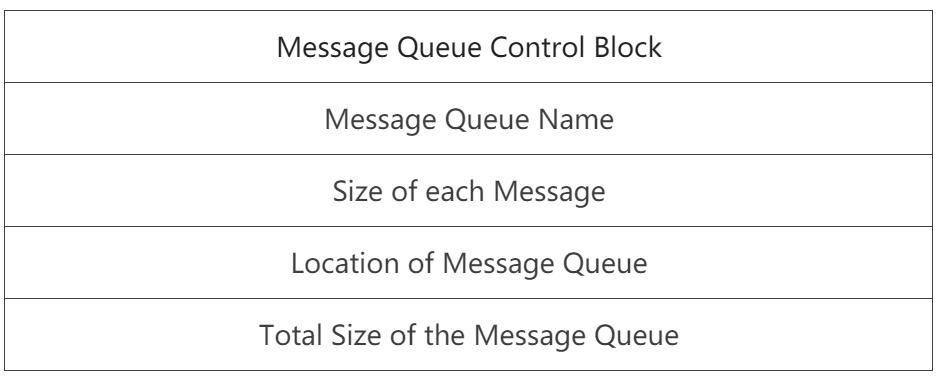
消息队列控制块(QCB)是用来保持运行时消息队列状态的数据结构。
消息队列控制块Queue的结构体
/* Define the queue structure utilized by the application.  */

typedef struct TX_QUEUE_STRUCT
{

    /* Define the queue ID used for error checking.  */
    ULONG               tx_queue_id;

    /* Define the queue's name.  */
    CHAR                *tx_queue_name;

    /* Define the message size that was specified in queue creation.  */
    UINT                tx_queue_message_size;

    /* Define the total number of messages in the queue.  */
    UINT                tx_queue_capacity;

    /* Define the current number of messages enqueued and the available
       queue storage space.  */
    UINT                tx_queue_enqueued;
    UINT                tx_queue_available_storage;

    /* Define pointers that represent the start and end for the queue's
       message area.  */
    ULONG               *tx_queue_start;
    ULONG               *tx_queue_end;

    /* Define the queue read and write pointers.  Send requests use the write
       pointer while receive requests use the read pointer.  */
    ULONG               *tx_queue_read;
    ULONG               *tx_queue_write;

    /* Define the queue suspension list head along with a count of
       how many threads are suspended.  */
    struct TX_THREAD_STRUCT
                        *tx_queue_suspension_list;
    UINT                tx_queue_suspended_count;

    /* Define the created list next and previous pointers.  */
    struct TX_QUEUE_STRUCT
                        *tx_queue_created_next,
                        *tx_queue_created_previous;

#ifdef TX_QUEUE_ENABLE_PERFORMANCE_INFO

    /* Define the number of messages sent to this queue.  */
    ULONG               tx_queue_performance_messages_sent_count;

    /* Define the number of messages received from this queue.  */
    ULONG               tx_queue_performance_messages_received_count;

    /* Define the number of empty suspensions on this queue.  */
    ULONG               tx_queue_performance_empty_suspension_count;

    /* Define the number of full suspensions on this queue.  */
    ULONG               tx_queue_performance_full_suspension_count;

    /* Define the number of full non-suspensions on this queue. These
       messages are rejected with an appropriate error code.  */
    ULONG               tx_queue_performance_full_error_count;

    /* Define the number of queue timeouts.  */
    ULONG               tx_queue_performance_timeout_count;
#endif

#ifndef TX_DISABLE_NOTIFY_CALLBACKS

    /* Define the application callback routine used to notify the application when
       the a message is sent to the queue.  */
    VOID                (*tx_queue_send_notify)(struct TX_QUEUE_STRUCT *queue_ptr);
#endif

    /* Define the port extension in the queue control block. This
       is typically defined to whitespace in tx_port.h.  */
    TX_QUEUE_EXTENSION

} TX_QUEUE;
queue包含主要成员的含义:
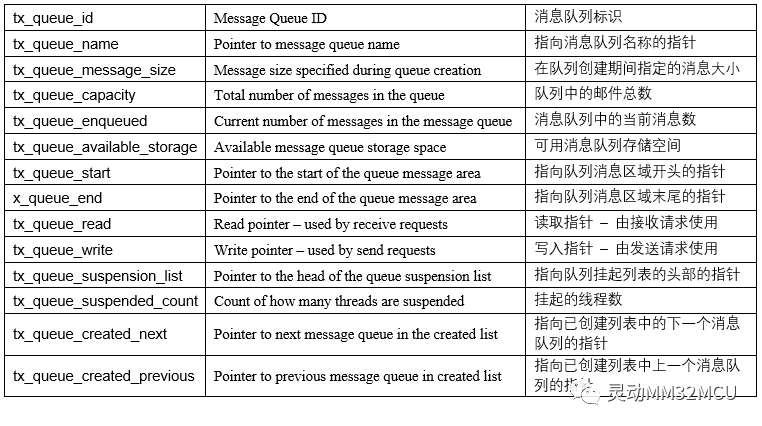
消息队列list
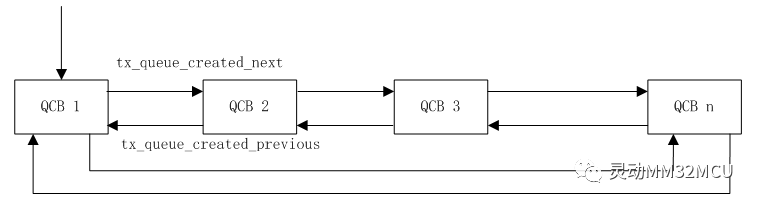
系统中所有信号量控制块挂载一个双向链表_tx_queue_created_ptr中,tx_queue_created_next指向下一个消息队列指针,tx_queue_created_previous指向前一个消息队列指针。
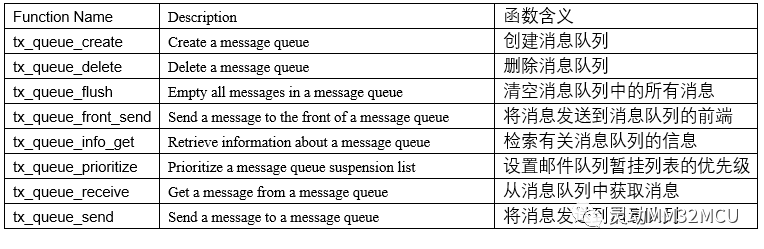
消息队列主要的服务函数
2.2 消息队列功能的演示
2.2.1 工程目录的建立
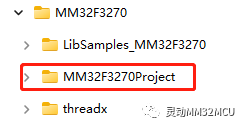
打开目标工程文件夹“MM32F3270Project”:
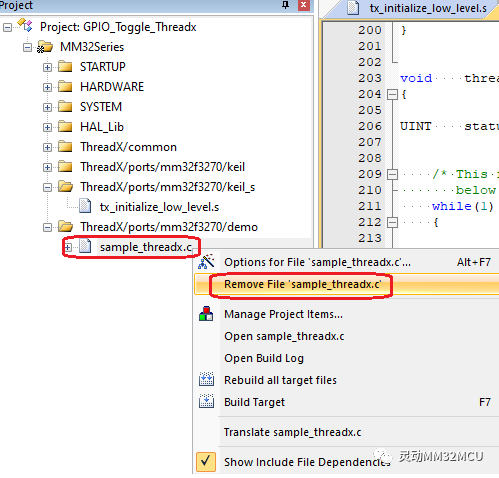
移除原有样例.c 文件sample_threadx.c:
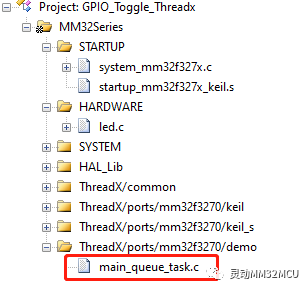
参考sample_threadx.c建立main_multi_task.c文件,并添加hardware目录中的led.c到工程项目中。
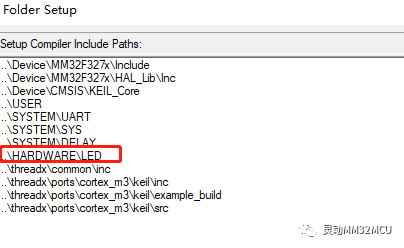
并把HARDWARE\LED目录添加到包含文件目录中:
2.2.2 创建消息队列_tx_queue_create
声明需要使用的消息队列变量,发送消息变量,接收消息变量(计算声明消息大小)。
还要声明消息队列缓冲块。
调用tx_queue_create, 建立消息队列。
创建一个待使用的消息队列
#define DEMO_QUEUE_SIZE         10
ULONG                   thread_1_messages_sent;
ULONG                   thread_2_messages_received;
TX_QUEUE                queue_0;
/* Define the queue area.  */
UCHAR                   queue_0_area[DEMO_QUEUE_SIZE*sizeof(ULONG)];

    /* Create the message queue shared by threads 1 and 2.  */
    tx_queue_create(&queue_0, "queue 0", TX_1_ULONG, \
        queue_0_area, DEMO_QUEUE_SIZE*sizeof(ULONG));
A. 第1个参数是消息队列控制块,引用声明的队列“queue_0”指向的地址。
B. 第2个参数是消息队列名字,字符串值为"queue 0"。
C. 第3个参数是消息队列每个消息的大小,消息大小范围1-16,每个消息4字节。
D. 第4个参数是消息队列缓冲地址,必须保证此地址4字节对齐,即此地址对4求余数为0。
E. 第5个参数是消息缓冲大小,单位字节。
F. 返回值
TX_SUCCESS (0x00) 创建成功。
TX_QUEUE_ERROR (0x09) 消息队列控制块无效。
TX_PTR_ERROR (0x03)无效的消息队列其实地址。
TX_SIZE_ERROR (0x05) 消息队列大小无效。
TX_CALLER_ERROR (0x13) 无效的调用
2.2.3 创建一个发送消息队列的任务
在此建立一个定时发送一个消息队列的简单任务,发送完成,发送计数值加一:
创建一个发送消息队列任务
void    thread_1_entry(ULONG thread_input)
{

UINT    status;


    /* This thread simply sends messages to a queue shared by thread 2.  */
    while(1)
    {

        /* Increment the thread counter.  */
        thread_1_counter++;

        /* Send message to queue 0.  */
        status =  tx_queue_send(&queue_0, &thread_1_messages_sent, TX_WAIT_FOREVER);

        /* Check completion status.  */
        if (status != TX_SUCCESS)
            break;
        tx_thread_sleep(10);
        /* Increment the message sent.  */
        thread_1_messages_sent++;
    }
}
tx_queue_send 用于消息队列发送,将要发送的数据复制到消息队列里面。
● A. 第1个参数是消息队列控制块。
● B. 第2个参数是要发送的数据地址。
● C. 第3个参数是等待选项:
参数:
TX_NO_WAIT (0x00000000),表示不管消息队列是否满,立即返回。
TX_WAIT_FOREVER (0xFFFFFFFF),表示永久等待,直到消息队列有消息。
● D. 返回值
TX_SUCCESS(0x00)设置成功。
TX_GROUP_ERROR(0x06)无效的事件标志组。
TX_OPTION_ERROR(0x08)无效设置选项。
TX_SUCCESS (0x00) 消息发送成功。
TX_DELETED (0x01) 任务挂起阶段,消息队列被删除。
TX_QUEUE_FULL (0x0B) 消息队列满,包含等待了指定时间后消息队列依然满。
TX_WAIT_ABORTED (0x1A) 消息队列被其它任务,定时器组或者中断服务程序终止。
TX_QUEUE_ERROR (0x09) 无效的消息队列控制块。
TX_PTR_ERROR (0x03) 无效的发送数据地址。
TX_WAIT_ERROR (0x04) 无效调用,主要是在非常任务代码中使用TX_NO_WAIT 以外的形参。
2.2.4 创建一个接收消息队列的任务
在此建立一个接收一个消息队列的简单任务,接收消息成功,接收计数值加一:
创建一个接收消息队列任务
 void    thread_2_entry(ULONG thread_input)
{

ULONG   received_message;
UINT    status;

    /* This thread retrieves messages placed on the queue by thread 1.  */
    while(1)
    {

        /* Increment the thread counter.  */
        thread_2_counter++;

        /* Retrieve a message from the queue.  */
        status = tx_queue_receive(&queue_0, &received_message, TX_WAIT_FOREVER);

        /* Check completion status and make sure the message is what we
           expected.  */
        if ((status != TX_SUCCESS) || (received_message != thread_2_messages_received))
            break;
        tx_thread_sleep(10);
        /* Otherwise, all is okay.  Increment the received message count.  */
        thread_2_messages_received++;
    }
}
tx_queue_receive函数函数用于消息队列数据获取,将消息队列中的数据复制出来。
● A. 第1个参数是消息队列控制块。
● B. 第2个参数是从消息队列取得的数据存储地址。
● C. 第3个参数是等待选项:
参数含义:
TX_NO_WAIT (0x00000000),表示不管消息队列是否空,立即返回。
TX_WAIT_FOREVER (0xFFFFFFFF),表示永久等待,直到消息队列有数据。
● D. 返回值
TX_SUCCESS(0x00)设置成功。
TX_GROUP_ERROR(0x06)无效的事件标志组。
TX_DELETED (0x01) 任务挂起阶段,消息队列被删除。
TX_QUEUE_EMPTY (0x0A) 消息队列空,包含等待了指定时间后消息队列依然空。
TX_WAIT_ABORTED (0x1A) 消息队列被其它任务,定时器组或者中断服务程序终止。
TX_QUEUE_ERROR (0x09) 无效的消息队列控制块。
TX_PTR_ERROR (0x03) 无效的数据存储地址。
TX_WAIT_ERROR (0x04) 无效调用,主要是在非常任务代码中使用TX_NO_WAIT 以外的形参。
3、Threadx 的运行与调试
3.1 下载与调试
下载调试默认会运行到main()函数。
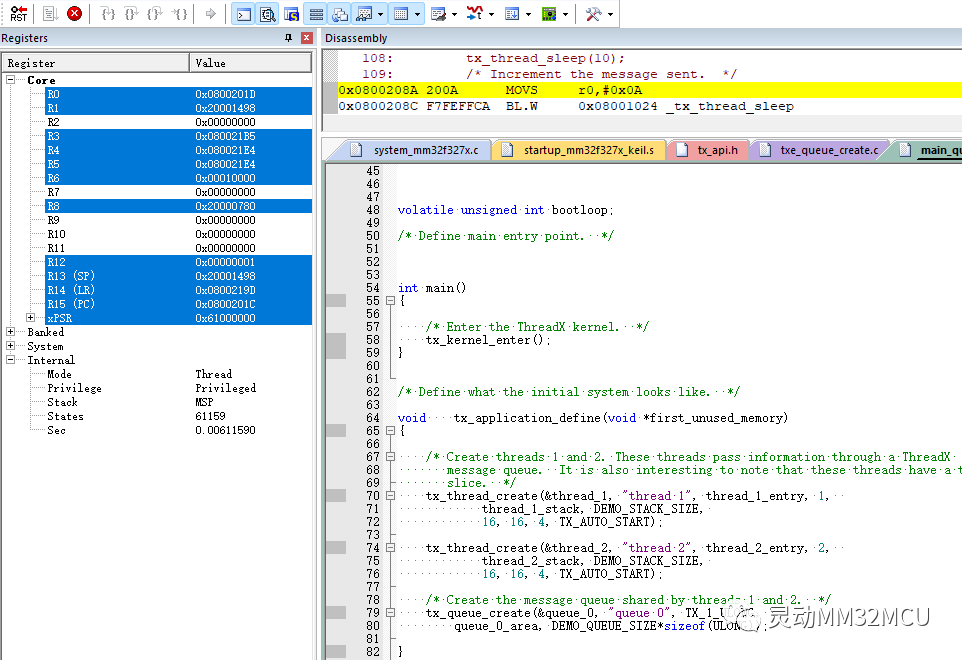
该demo示例,建立了2个线程,程序执行一个发送队列,另外一个线程接收队列,实现执行Task Counter与发送&接收的Message Counter的累加。
全速运行后,可以看到相关的数值在变化:
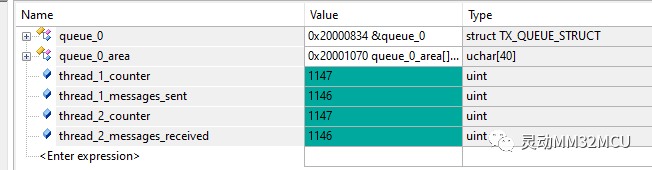
这个演示程序中,使用了tx_thread_sleep()函数做了延时,刚好使得发送消息队列与接收队列一一配对,没有出现发送消息满的情况与接收空的情况。有兴趣的话,可以把延时函数注释掉,看看会出现什么情况,并做进一步的调试。
4、小结
Azure RTOS ThreadX 的使用消息队列是非常高效率与方便,结合MM32F3270的强大性能,可以体验Azure RTOS的各种特色功能。
来源:灵动MM32MCU
免责声明:本文为转载文章,转载此文目的在于传递更多信息,版权归原作者所有。本文所用视频、图片、文字如涉及作品版权问题,请联系小编进行处理(联系邮箱:cathy@eetrend.com)。